

The Apna Khet Apna Rozgar Portal issues have become one of the biggest concerns for applicants across Punjab right now. While the scheme itself promises land, financial support, and a real chance at farming-based income, many users are stuck due to login failures, OTP delays, and registration errors.
This article breaks down every major issue people are facing on the portal and provides simple, practical fixes that actually work. From solving CNIC login problems to avoiding document upload mistakes, you’ll find everything you need to complete your application smoothly and secure your opportunity under this scheme.
What is Apna Khet Apna Rozgar Scheme 2026?
This is not just another government scheme; it’s a livelihood opportunity. The Punjab government has identified nearly 2.5 lakh acres of agricultural land and is offering it on lease to landless but skilled farmers.
What makes it powerful is the financial support:
- Rs. 50,000 per acre is provided for land development
- Helps in soil preparation, irrigation setup, and initial farming costs
- Reduces dependency on loans or middlemen
For many families, this is the first real chance to earn through farming.
Quick Info Table — Apna Khet Apna Rozgar Scheme 2026
| Detail | Information |
|---|---|
| Scheme Name | Apna Khet Apna Rozgar Scheme 2026 |
| Program Managed By | Government of Punjab |
| Target Beneficiaries | Landless farmers and rural families |
| Land Allocation | Up to identified government land |
| Financial Support | Rs 50,000 per acre |
| Age Limit | 18 to 50 years |
| Required Documents | CNIC, Land Record (Fard), Mobile Number |
| Application Method | Online through AKAR Portal |
| Main Purpose | Up to the identified government land |
Major Apna Khet Apna Rozgar Portal Issues in 2026
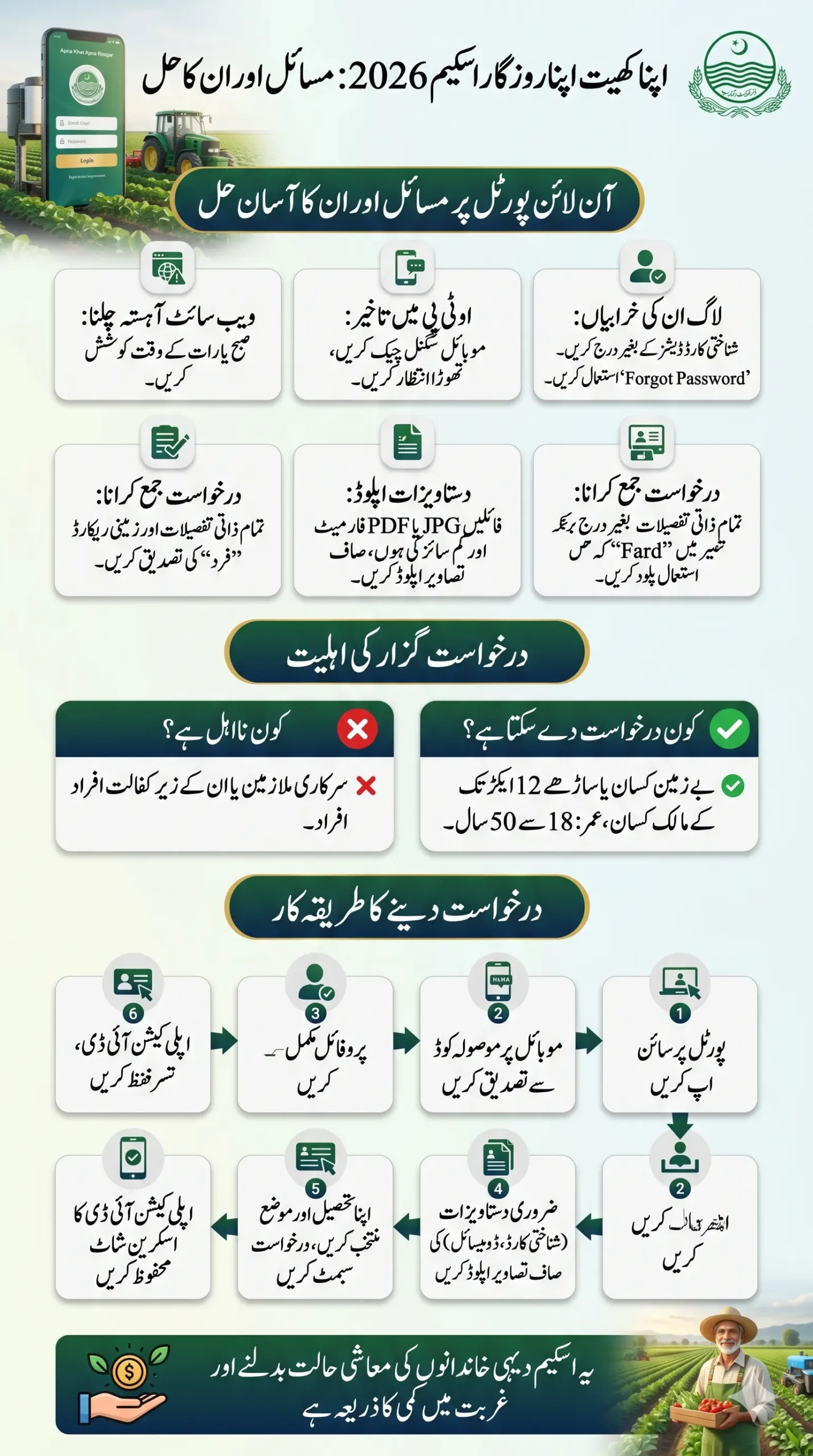
Many applicants are facing technical problems while using the registration portal. These issues are common and mostly related to incorrect data entry or heavy website traffic.
Here are the most reported problems in 2026:
- Login error or wrong password message
- OTP not received on mobile
- Website loading slowly
- Document upload failure
- CNIC verification issue
- Registration submission error
The important thing to understand is that these problems are temporary, not permanent rejections.
Also Read: Govt Employee Bike Scheme Online Apply 2026: Step-by-Step Registration Process
Login Errors & Their Quick Fixes
If you are unable to log in, do not panic. Most login problems happen due to small mistakes.
1. Account Already Exists Error
This message appears when your CNIC is already registered.
Solution:
- Use the Forgot Password option
- Reset your password instead of creating a new account
2. User ID or Password Wrong
This is the most common issue faced by applicants.
Solution:
- Enter CNIC without dashes
- Turn off Caps Lock
- Remove extra spaces
- Carefully type your password
Even a small typing mistake can block login access.
3. OTP Not Received Problem
Sometimes the confirmation code does not arrive due to network or system delays.
Solution:
- Wait 1 to 2 minutes
- Check mobile signal strength
- Restart your phone
- Try again during non-peak hours
This issue is especially common in rural areas with weak signals.
4. Website Slow or Not Loading
When thousands of users access the portal at the same time, the system becomes slow.
Solution:
- Use the portal early in the morning
- Try late-night access
- Avoid peak hours
This simple timing trick solves the issue for many users.
Read More: AKAR Pulse Portal Login 2026: Apna Khet Apna Rozgar Online Apply, Eligibility & Full Guide
Registration Problems & Their Solutions (2026)
Registration errors can delay your application, but they are usually easy to fix.
Document Upload Failed
This happens when the file size is too large or the format is incorrect.
Solution:
- Use JPG or PDF format
- Compress file size
- Upload clear and readable images
No Confirmation SMS After Submission
Sometimes the message does not appear even after a successful submission.
Solution:
- Check your application dashboard
- Look for the generated Application ID
- Save a screenshot for proof
CNIC Not Verified Issue
This problem occurs when your personal details do not match official records.
Solution:
- Ensure your name matches your CNIC
- Verify the father’s name spelling
- Confirm address details
These records are verified through the National Database and Registration Authority system.
Land Record Mismatch Error
If your land record information is outdated, your application may be rejected.
Solution:
- Update your land record (Fard)
- Ensure names match CNIC details
- Verify ownership status
Must Read: Akar Pulse Gov PK Registration 2026 – Complete Guide to Apply for Apna Khet Apna Rozgar Scheme
Who Can Apply for Apna Khet Apna Rozgar Program?
Before applying, make sure you meet the official eligibility criteria. Many applications get rejected simply because applicants do not check these conditions.
Eligibility Requirements
- Applicant must be landless or own only one house up to 10 marla
- Must be a resident of the same village or the nearby area
- Only one applicant allowed per family
- Age must be between 18 and 50 years
- Small farmers with up to 12.5 acres can apply
Who Cannot Apply
- Government employees (federal or provincial)
- Dependents of government employees
- Families are already benefiting from another government land scheme
- Applicants providing false information
Honesty in application details is very important. Any incorrect information can lead to cancellation.
Step-by-Step Guide — Apply Online for AKAR Pulse 2026
Many people get confused during the application process. Follow these steps carefully to avoid mistakes.
Step 1 — Create Your Account
Open the official portal and click Sign Up.
Enter:
- CNIC number
- Mobile number
- Division and district
- Household details
You will receive a 6-digit verification code on your mobile.
Step 2 — Set Password and Login
After verification:
- Create a strong password
- Log in using CNIC and password
Step 3 — Complete Your Profile
Fill all personal details carefully:
- Full name
- Father’s name
- Date of birth
- Marital status
- Address and profession
Click Save Profile.
Step 4 — Upload Required Documents
Upload clear images of:
- Front side of CNIC
- Back side of CNIC
- Domicile certificate
Blurry images can delay approval.
Step 5 — Submit Your Application
Select your:
- Tehsil
- Moza
Review information and click Submit Application. Your application will be officially registered.
Step 6 — Check Application Schedule
After submission:
- Open Application Schedule section
- Check review date
- Track application progress
This helps you stay updated about your application status.
Also Read: Today Update! Asaan Karobar loan Scheme Registration Reopen with Zero-Interest Loans in 2026
Important Tips to Avoid Portal Problems in 2026
These simple tips can save you time and prevent frustration.
- Always double-check the CNIC number
- Keep documents ready before starting
- Use a stable internet connection
- Apply during non-peak hours
- Save the screenshot after submission
- Keep your mobile number active
These small precautions make a big difference in successful registration.
Why This Scheme Matters for Rural Families
For thousands of unemployed youth and farmers, this scheme is more than just land; it is hope. Many families struggle to earn a daily income, and farming opportunities can change their entire future.
With land access and financial support, families can:
- Start an agriculture business
- Generate stable income
- Support children’s education
- Reduce poverty
- Build long-term financial security
This is why the Apna Khet Apna Rozgar Scheme 2026 is being called one of the most impactful rural programs in Punjab right now.
Also Read: 8171 BISP Registration Check by CNIC April Via Web Portal – Know Full Details
Final Words
The Apna Khet Apna Rozgar Portal Issues situation may look stressful at first, but the reality is simple — most problems are technical and easily fixable. By entering correct details, uploading proper documents, and applying at the right time, applicants can complete registration smoothly.
If you or someone in your village is planning to apply, do not delay. Prepare your documents, follow the correct steps, and take advantage of this opportunity to build a better future through farming.